

Persistent Memory
Maintain context across different agent sessions without ballooning your prompt size.
Auto Recall
Automatically inject relevant episodic and semantic memories before your agent responds.
Features
- Auto Recall: Searches memories before the agent responds and injects matches into the context.
- Auto Capture: Automatically sends every exchange to MemMachine after the agent responds.
- Native Functions: Registers
memory_search,memory_store,memory_forget, andmemory_getdirectly in OpenClaw. - Version Support: Requires MemMachine plugin v0.3.0 or higher.
Setup
1
Install the Plugin
- Install via OpenClaw CLI
- Install for Local Development
Use this command to pull the latest stable version of the plugin directly from our registry:
openclaw hooks install for this package. It is an OpenClaw plugin pack that exports openclaw.extensions, not a hook pack with openclaw.hooks.2
Configure Credentials
If you are using the MemMachine Platform (Cloud), retrieve your API key from the MemMachine Cloud console.Note: An API key is only required when connecting to the Cloud platform. For local deployments, this field may be omitted.You can configure the plugin through the OpenClaw Gateway Dashboard under
Settings > Plugins or by editing your openclaw.json file.3
Initialize Configuration
Add the
openclaw-memmachine entry to your plugins.entries object in openclaw.json:- MemMachine Cloud
- Local Deployment
UI Configuration
For a no-code approach, use the OpenClaw Gateway Dashboard to toggle features and manage identifiers.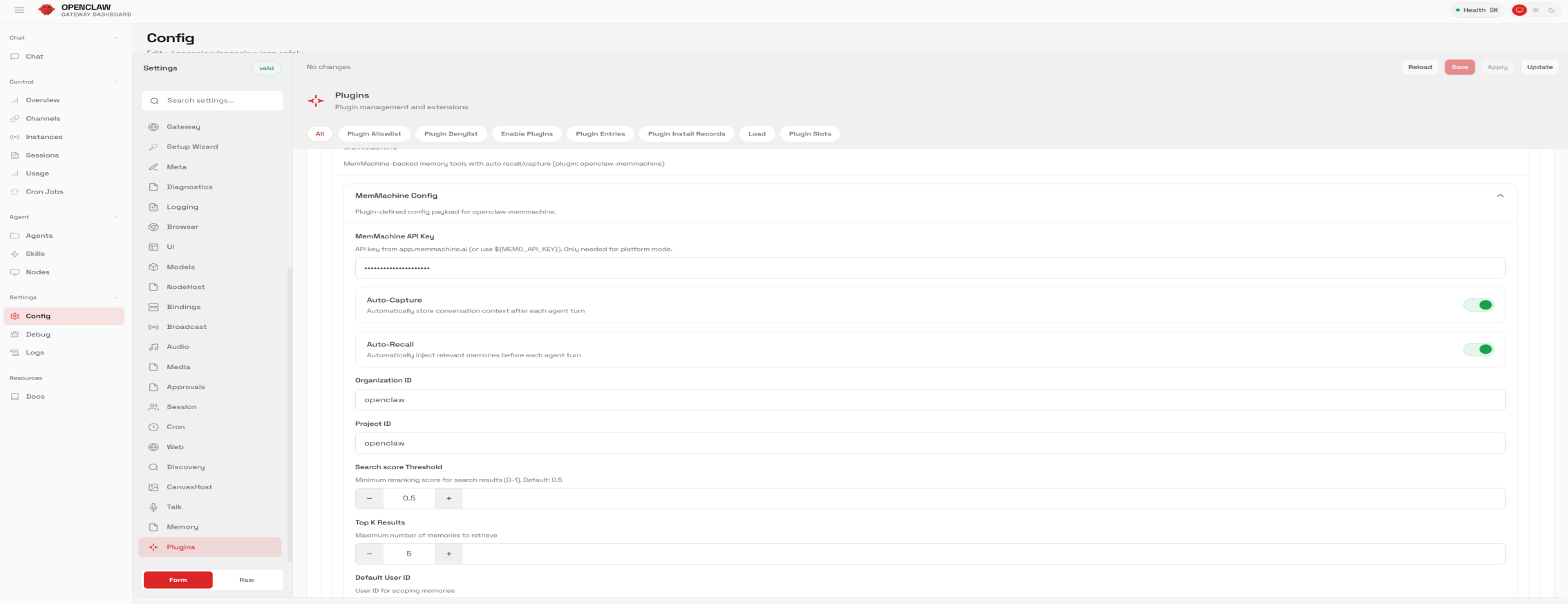
Configuration Parameters
Pro Tip: Tuning the Search score Threshold is key; a value of
0.5 is a good baseline, but increase it if your agent is recalling loosely related, noisy information.CLI Commands
The plugin registers two CLI functions for manual memory management and debugging:search: Search MemMachine memory directly from the command line.stats: Retrieve usage and health statistics from MemMachine.